APRS guidelines incorporating the new n-N paradigm
IARU Region 1 adopts the new n-N paradigm
At the November 2008 conference, TRACE n-n versus WIDE n-n was discussed and IARU agreed that Region 1 should adopt the new n-N paradigm.
The UK and others should switch to traceable WIDE n-n digis. Users should set unproto to APRS,WIDE3-3 [home] and WIDE1-1,WIDE2-2 [mobile].
UI-View: check uiview32.ini has UITRACE=WIDE and UIFLOOD=TRACE (opposite of the default). ALIAS= should include WIDE1-1 and WIDE1.
Fixing the APRS network
Parts of the USA network suffered major congestion — original design plus a dupe-check issue on standalone KPC-3s. Bob Bruninga tweaked the design to cut the packets created when a station beacons.
Fairly unique to the USA, but after a major US push most of the world adopted the standard. Further reading: Bob’s page.
Alias RELAY to WIDE1-1
In the digi setup replace RELAY with WIDE1-1 so WIDE n-n duplicate suppression can kick in.
TRACE n-n to SSS n-n
UIFLOOD / TRACE n-n should break the network into areas. Set SSS to your ITU country code so, for example, APRS,GBR7-7 is only digipeated inside the UK. In the USA they use the state code (MI for Michigan).
Unproto paths
Once the network is reconfigured:
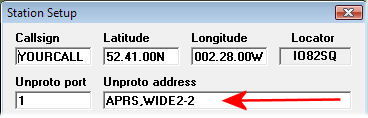
APRS,WIDE2-2 — home
WIDE1-1,WIDE2-2 — mobile
APRS,GBR3-3 — area-specific
Configuring UIDIGI
UIFLOOD GBR · UITRACE WIDE — replace GBR with your country code.
Configuring Kenwood D700
Use ID, not NOID on UIFLOOD or you get the −15 −14 −13 source-callsign decrement bug.
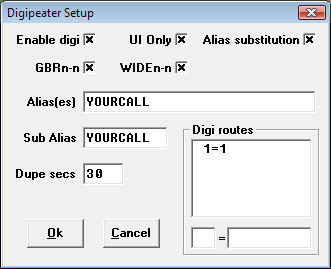
This form builds a replacement for the [DIGI_OPTIONS] section in C:\Program Files\Peak Systems\UI-View32\UIView32.INI. The new config makes the digi WIDE n-n traceable.
After the UI-View32 change
The digipeater setup should look like this:
TRACE n-n replaced with WIDE n-n (traceable WIDE)
WIDE n-n replaced with GBR n-n (non-traceable GBR)
Also update unproto to APRS,WIDE2-2 (UI-View style).
Display radio coverage
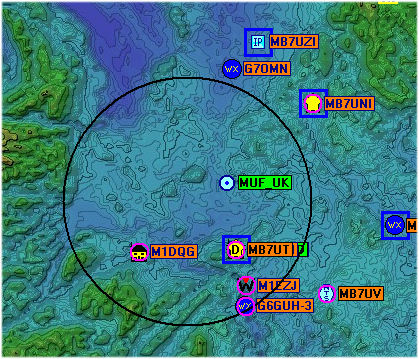
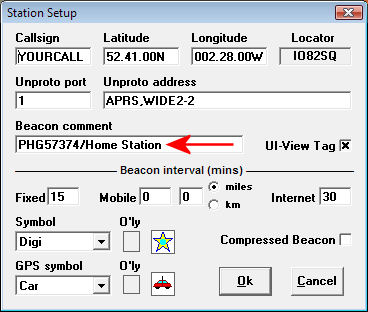
APRS PHG plus the add-on UI-PHG draws coverage circles on UI-View.